Thursday, January 30, 2014

using some of the SPUtility Methods

HandleAccessDenied using

SPUtility.HandleAccessDenied(new AccessDeniedException("ACCESS DENIED"));
(or)
SPUtility.HandleAccessDenied(new Exception("You do not have access to this page."));


SendEmail using

SPUtility.SendEmail(webObj, false, false, "e-mail_address", "Web Discussion Report", Msg);
(or)
StringDictionary headers = new StringDictionary();
headers.add("to","reginald@myfatblog.co.uk");
headers.add("cc","thisiscopy@myfatblog.co.uk");
headers.add("bcc","thisistheblindcopy@myfatblog.co.uk");
headers.add("from","MySharePointEmail@myfatblog.co.uk");
headers.add("subject","How to use SendEMail from SPUtility");
headers.add("content-type","text/html"); //This is the default type, so isn't neccessary.
string bodyText ="This is the body of my email, in html format.";
SPUtility.SendEmail(web, headers, bodyText);
using GetFullUrl
Some SharePoint objects expose relative paths.
Relative paths can be converted to full Url by adding current server, site paths.
To convert a relative path to the full URL, you add the current server,
Rather than performing path manipulation, "GetFullUrl" method can be used.
Example- Get Full Url Of A SharePoint List
SPUtility.GetFullUrl(SPContext.Current.Site, listobj.DefaultDisplayFormUrl);
Example- Get Full Url Of A SharePoint ListItem
SPUtility.GetFullUrl(SPContext.Current.Site,"/"+ itemobj.Url);
Using GetListGuid
Guid id = SPUtility.GetListGuid(webObj,strListName);
Using Redirect
SPUtility.Redirect(“/MyFolder/MyPage.aspx”, SPRedirectFlags.RelativeToLayoutsPage, HttpContext.Current);
On SharePoint 2010 it will redirect tohttp://yoursite/_layouts/MyFolder/MyPage.aspx while on SharePoint 2013 it will redirect to http://yoursite/_layouts/15/MyFolder/MyPage.aspx. You see that in SharePoint 2013 the URL it contains the HIVE folder while in 2010 it doesn’t. Using the Redirect method with the RelativeToLayoutsPage option you don’t have to worry about that.
Other Reference:

TransferToErrorPage and TransferToSuccessPage

SPUtility.TransferToErrorPage("Hi this is an Error Page {0}, {1}", "click here to Go to Top site", "{your_url}");
SPUtility.TransferToSuccessPage("Hi this is an Sucess Page");
Reference:

Sunday, January 26, 2014

Access SPList object using web.Lists or web.GetList

Accessing SPList Object using web.Lists method

                   SPList listObj = webObj.Lists["DataTypes"];
                    int itemcount = listObj.ItemCount;

Accessing SPList Object using web.GetList method            
                   
                    SPList listObj2 = webObj.GetList(webObj.ServerRelativeUrl.TrimEnd('/') + "/Lists/DataTypes");
                    int itemcount2 = listObj2.ItemCount;

Some times we may change the list name after creating the list. In that case web.Lists accessing method gives error. So better to adopt GetList method when accessing lists.


which user using when using RunWithElevatedPrivileges in coding

Some times we are blindly using RunWithElevatedPrivileges in the code. But we should know what user context using when using that. Some times we are blindly thinking that if we wrap the code in elevated privileges, its running in app pool account. But its wrong.

Observe the below two code blocks.
In first code block user is App pool accont user, but in 2nd senario user is current logedin user. Even u wrap the code its using current login user because your using spcontext.

1. SPSecurity.RunWithElevatedPrivileges(delegate()
            {
                using (SPSite site = new SPSite("http://xrm:1234"))
                {
                    using (SPWeb web = site.OpenWeb())
                    {
                        SPUser user = web.CurrentUser;
                        string username = user.LoginName;
                   }
                }
             });


2. SPSecurity.RunWithElevatedPrivileges(delegate()
            {
                    SPSite site = new SPSite(SPContext.Current.Site.ID);
                    SPWeb web = SPContext.Current.Web;
                    SPUser user2 = SPContext.Current.Web.CurrentUser;
                    string currentUser2 = user2.LoginName;
            });


Saturday, January 25, 2014

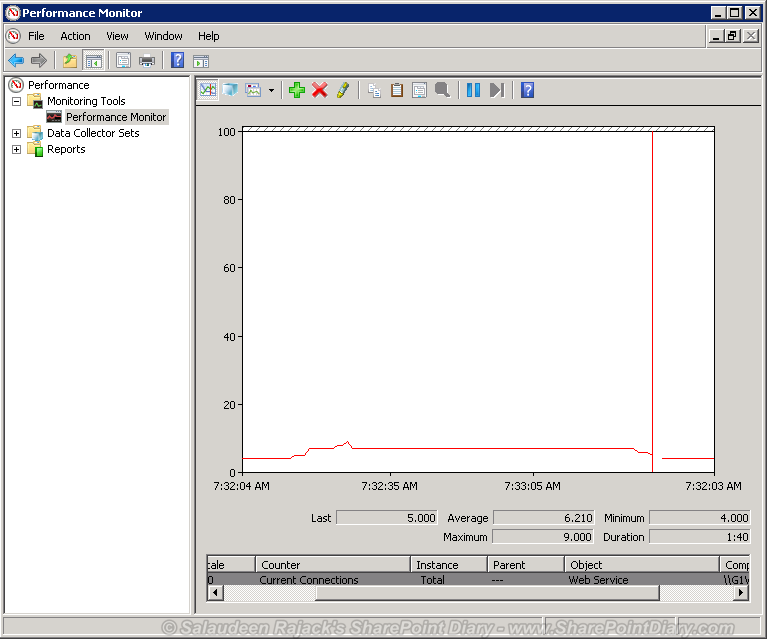
Find the Number of Users Currently Connected to SharePoint Site

Had to perform an unplanned IIS Reset to fix an issue in production SharePoint Farm. But executing IISReset breaks ongoing user sessions and give "Service Unavailable" error message, isn't it? Wouldn't it be a good idea to find the No. of users currently connected with the SharePoint site and do the IISReset for a minimal impact? Sure!

How to find how many users connected with SharePoint sites? use Performance Monitor!
  • Go to Start >> Run >> Type "Perfmon", to fire up Performance Monitor.
  • Click on "Performance Monitor" , Right click "Add Counters" in Graph windowsharepoint how many users connected
  • Under the available Counters, Pick "Web Service" expand the node and select "Current Connections"
  • Under "Instances of Selected object" You can either select "Total" or pick a particular web applicationFind the number of users Currently Connected to SharePoint Site
  • Click on Add button to add the selected counter, and click "OK" button
Now the graph will show the how many users connected to your SharePoint Site(s).
sharepoint number of users connected
Please not, this gives only the no of user sessions currently ongoing. But not the one already completed (Doesn't count the users already opened the site and left it idle!) There are possibilities that users may hit the SharePoint URL meanwhile and receive "Service Unavailable" message since IIS is reset!

Reference:

http://www.sharepointdiary.com/2013/05/find-number-of-users-currently-connected-to-sharepoint.html

Show Quick Launch in SharePoint 2010 Web Part Pages

By default, SharePoint 2010 Web part pages don't have quick launch navigation! Web part page missing quick launch in SharePoint 2010.  
show quick launch sharepoint web part page
show quick launch in SharePoint web part page
Show quick launch SharePoint 2010 web part page:
We can bring it by editing web part page. Just Edit the webpart page in the SharePoint Designer 2010 Advanced mode and remove the following code (As same in SharePoint 2007):
add quick launch to sharepoint web part page
?
1
2
<asp:Content ContentPlaceHolderId="PlaceHolderNavSpacer" runat="server"></asp:Content>
<asp:Content ContentPlaceHolderId="PlaceHolderLeftNavBar" runat="server"></asp:Content>
sharepoint 2010 quick launch missing from web part page

In SharePoint 2010 you have to also remove the following CSS code: 
?
1
2
3
4
5
6
7
8
9
10
11
12
<style type="text/css">
 
body #s4-leftpanel
{
display:none;
}
.s4-ca
 
{
margin-left:0px;
}
</style>
sharepoint display quick launch web part page
Save the page! This will bring Quick launch bar again!! Here is the result: quick launch on SharePoint 2010 web part page. 
sharepoint 2010 add quick launch menu to web part page
This solves the issue of SharePoint 2010 quick launch missing from web part page. Here is my SharePoint 2007 version of this post: SharePoint 2007 Quick Launch (left navigation) Missing in Web part pages - Solutions


Reference:

http://www.sharepointdiary.com/2013/03/show-quick-launch-in-sharepoint-2010-web-part-pages.html

Image noise comparison methods

 1. using reference image technique     - peak_signal_noise_ratio (PSNR)     - SSI 2. non-reference image technique     - BRISQUE python pac...